File I/O
I/O data structure
Data structures used by the kernel for all I/O.
The kernel uses three data structures to represent an open file.
-
Each process has a table of open file descriptors. Associated with each file descriptor are:
- The file descriptor flags (close-on-exec)
- A pointer to a file table entry
-
The kernel maintains a file table for all open files. Each file table entry contains
- The file status flags for the file (read, write, append, sync, and non-blocking)
- The current file offset
- A pointer to the v-node table entry for the file
-
Each open file (or device) has a v-node structure that contains information about the type of file and points to functions that operate on the file (Linux has no v-node but a generic i-node).
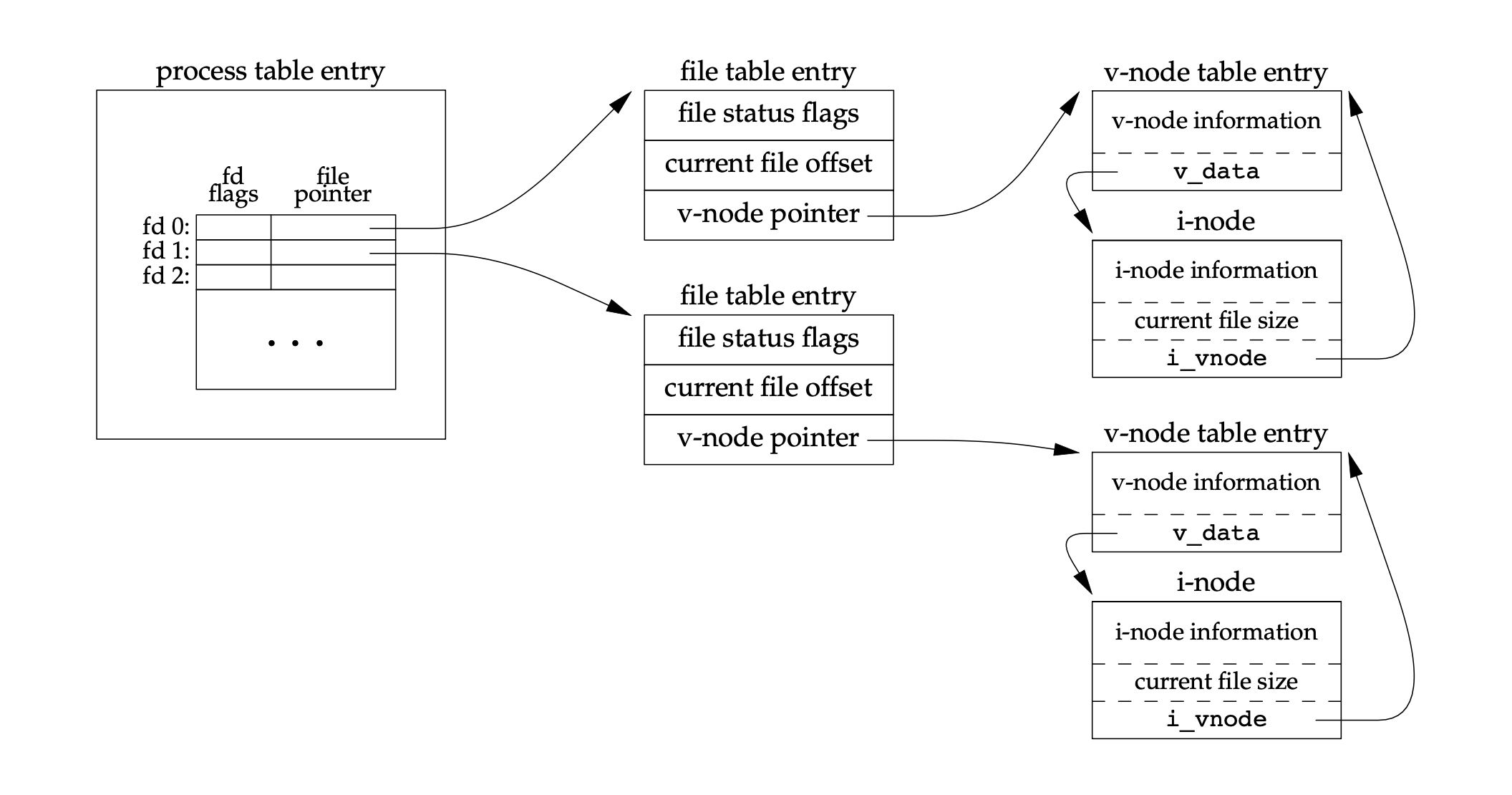
When a process is created, the kernel creates a table of open file descriptors for the process. The table is initialized with three entries: 0, 1, and 2. Entry 0 is the standard input, entry 1 is the standard output, and entry 2 is the standard error. If we to open another file, the kernel allocates the lowest-numbered unused file descriptor for the process.
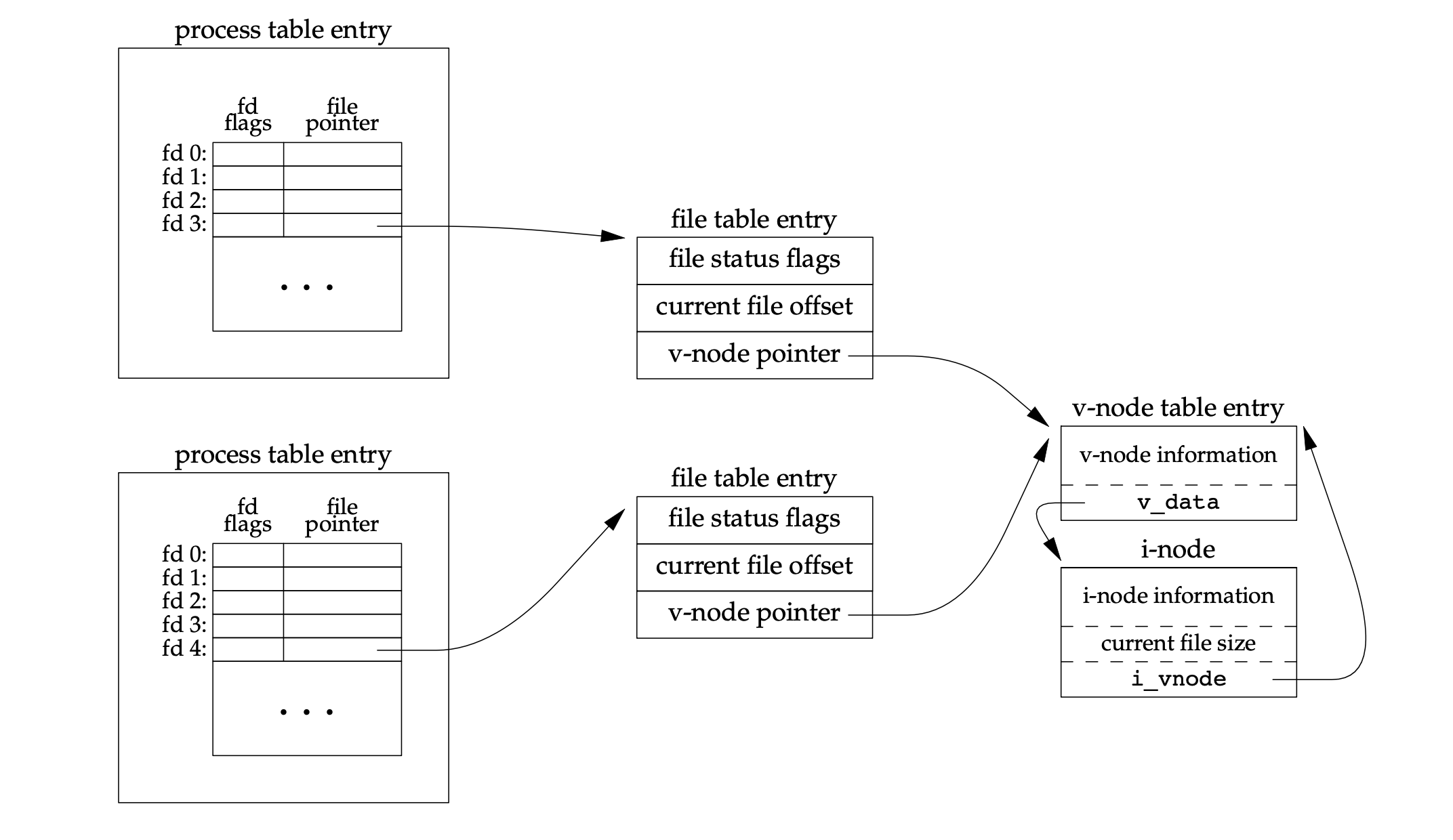
If two independent process have the same file open, then each process has a file descriptor point to two different table entries which point to the same v-node. Each process has it own current file offset in the file table entry. Which allows each process to have its own read/write pointer.
Operations
write
write: after eachwriteis complete, the current file offset in the file table entry is incremented by the number of bytes written. Ifoffset > file_size,file_size = offset=> the file is extended.- If a file is opened with the
O_APPENDflag, a flag is set on the file status flags for the file table entry. Each time awriteis performed for a file with append flag set, the current offset is set to the current file size of the i-node table entry. This forces everywriteto be append to the end of the file. - If a file is positioned to its current end of file using
lseek, the current file offset is set to the current file size of the i-node table entry. lseekonly changes the current file offset in the file table entry. There is no I/O operation associated withlseek.
#include <sys/fcntl.h>
#include "util.h"
#include <unistd.h>

int main(void) {
    int fd = open("./test", O_RDWR | O_CREAT);
    if (fd == -1) {
        handle_error(errno, "open");
    }

    int n;
    char buf[BUFSIZ];
    while ((n = read(STDIN_FILENO, buf, BUFSIZ)) != 0) {
        if (write(fd, buf, n) != n) {
            handle_error(errno, "write error");
        }
    }

    return 0;
}
This program reads from the standard input and writes to a file. The file is created if it does not exist. The file is opened for reading and writing. The program reads from the standard input and writes to the file until the end of the input is reached.
First let check the process id of the program then we can see what
file descriptors are open for the process. Since I compiled the program
to a.out, I can check the process id by running
ps -ef | grep a.out.
ps -ef | grep a.out

ban         5864    5195  0 11:56 pts/1    00:00:00 [rosetta] /Users/ban/Documents/Learn/learn/C/./a.out ./a.out
We know the process id is 5864. Now we can check the file descriptors
for the process. In Linux, we can go to
/proc/<pid>/fd to see the file descriptors.
cd /proc/5864/fd
ls -l

total 0
lrwx------ 1 ban ban 64 Jan  4 12:02 0 -> /dev/pts/1
lrwx------ 1 ban ban 64 Jan  4 12:02 1 -> /dev/pts/1
lrwx------ 1 ban ban 64 Jan  4 12:02 2 -> /dev/pts/1
lr-x------ 1 ban ban 64 Jan  4 12:02 3 -> /usr/bin/fish
lr-x------ 1 ban ban 64 Jan  4 11:56 4 -> /Users/ban/Documents/Learn/learn/C/a.out
lrwx------ 1 ban ban 64 Jan  4 12:02 5 -> /Users/ban/Documents/Learn/learn/C/test
We can see that file descriptor 0, 1, and 2 are standard input, output, and error. File descriptor 3 is the shell that is running the program. File descriptor 4 is the program itself. File descriptor 5 is the file that the program is writing to.
We can then check the current offset of the file descriptor 5 by
going to /proc/<pid>/fdinfo/<fd>.
cd /proc/5864/fdinfo
cat 5

pos:    0
flags:  0400002
mnt_id: 143
ino:    514
The current offset is 0. The ino is the inode number of
the file. Currently we have not written anything to the file yet. Let's
write something to the file.
^C
ban@ubuntu-intel:/Users/ban/Documents/Learn/learn/C$ gcc main.c
ban@ubuntu-intel:/Users/ban/Documents/Learn/learn/C$ ./a.out
test test
Now we can check the current offset of the file descriptor 5 again.
pos:    10
flags:  0400002
mnt_id: 143
ino:    514
After input test test to the program, the current offset
is now 10.
References
- Advanced Programming in the UNIX Environment, 3rd Edition