Load balance(Multipath) Application on RYU
Note: This article is translated from Muzixing's blog and images from another copy of this article. I haven't asked for permission about translation and there is no license for this article, so it is only used for CS8803-SICC 21SPRING for now. The translation is helped by deepl.com.
Preface
This blog post introduces how to use select group to
implement multipath on RYU, so as to achieve traffic scheduling and
complete a simple load balancing demo. In OpenFlow13,
group table is used to achieve multicast and redundancy
disaster recovery. In the experiment, we still use queue to guarantee
the bandwidth of the link.
Related work
To complete multipath transmission, the network topology must have loop, so the first step is to solve the possible storm due to loop. The solution has been proposed in a previous blog post. This blog uses this idea to remove of loop storms (which may not be successful in some cases, for unknown reasons)
Network topology
The content of the network topology file is shown below and can also be downloaded from github, see the end of the article for details.
"""Custom loop topo example

   There are two paths between host1 and host2.

                |--------switch2 --------|
   host1 --- switch1        |            switch4 ----host2
                |           |            |  |______host3
                -------- switch3 ---------
                            |
                          host4

Adding the 'topos' dict with a key/value pair to generate our newly defined
topology enables one to pass in '--topo=mytopo' from the command line.
"""

from mininet.topo import Topo


class MyTopo(Topo):
    "Simple loop topology example."

    def __init__(self):
        "Create custom loop topo."

        # Initialize topology
        Topo.__init__(self)

        # Add hosts and switches
        host1 = self.addHost('h1')
        host2 = self.addHost('h2')
        host3 = self.addHost('h3')
        host4 = self.addHost('h4')
        host5 = self.addHost('h5')
        host6 = self.addHost('h6')
        switch1 = self.addSwitch("s1")
        switch2 = self.addSwitch("s2")
        switch3 = self.addSwitch("s3")
        switch4 = self.addSwitch("s4")
        switch5 = self.addSwitch("s5")

        # Add links
        self.addLink(switch1, host1, 1)
        self.addLink(switch1, switch2, 2, 1)
        self.addLink(switch1, switch3, 3, 1)
        self.addLink(switch2, switch4, 2, 1)
        self.addLink(switch3, switch4, 2, 2)
        self.addLink(switch2, switch3, 3, 4)
        self.addLink(switch5, switch1, 1, 4)
        self.addLink(switch5, switch2, 2, 4)

        self.addLink(switch4, host2, 3)
        self.addLink(switch4, host3, 4)
        self.addLink(switch5, switch4, 3, 5)
        self.addLink(switch3, host4, 3)
        self.addLink(switch5, switch3, 4, 5)
        self.addLink(switch2, host5, 5)
        self.addLink(switch4, host6, 6)

topos = {'mytopo': (lambda: MyTopo())}
Multipath
After solving the problem that the network may form a storm, you can
use the select type of group_table to
implement multipath function.
def send_group_mod(self, datapath):
    ofp = datapath.ofproto
    ofp_parser = datapath.ofproto_parser

    port_1 = 3
    actions_1 = [ofp_parser.OFPActionOutput(port_1)]

    port_2 = 2
    actions_2 = [ofp_parser.OFPActionOutput(port_2)]

    weight_1 = 50
    weight_2 = 50

    watch_port = ofproto_v1_3.OFPP_ANY
    watch_group = ofproto_v1_3.OFPQ_ALL

    buckets = [
        ofp_parser.OFPBucket(weight_1, watch_port, watch_group, actions_1),
        ofp_parser.OFPBucket(weight_2, watch_port, watch_group, actions_2)]

    group_id = 50
    req = ofp_parser.OFPGroupMod(
        datapath, ofp.OFPFC_ADD,
        ofp.OFPGT_SELECT, group_id, buckets)

    datapath.send_msg(req)
We don't know if the key of OVS select has been changed,
where the original key is dl_dst. When the successful flow
is matched, the select is executed with dl_dst as the key,
and then an action_list is selected from the buckets.
To view the group table information.
sudo ovs-ofctl dump-groups s1 -O OpenFlow13
To view flow table information:
sudo ovs-ofctl dump-flows s1 -O OpenFlow13
QoS First of all, we know that OpenFlow cannot create queues. So we
can configure queues via ovsdb, or we can directly use the
ovs command to configure them:
ovs-vsctl -- set Port s1-eth2 qos=@newqos \
     -- --id=@newqos create QoS type=linux-htb other-config:max-rate=250000000 queues=0=@q0\
     -- --id=@q0 create Queue other-config:min-rate=8000000 other-config:max-rate=150000000\

ovs-vsctl -- set Port s1-eth3 qos=@defaultqos\
    -- --id=@defaultqos create QoS type=linux-htb other-config:max-rate=300000000 queues=1=@q1\
     -- --id=@q1 create Queue other-config:min-rate=5000000 other-config:max-rate=200000000

ovs-vsctl list queue
The above code creates queue 0 on s1-eth2, queue 0 and
queue 1 on s1-eth3, and configures max_rate and
min_rate.
To view the queue information, you can use.
sudo ovs-ofctl queue-stats s1 2 -O OpenFlow13
To list ports to view qos. ovs-vsctl list port
To list queues: ovs-vsctl list queue
ovs-vsctl list queue
Delete QOS: sudo ovs-vsctl --all destroy qos
sudo ovs-vsctl --all destroy queue
Unlike OpenFlow 1.0, OpenFlow 1.3 has only one queue_id
for incoming queue operations, which requires an additional port, i.e.
the following actions are required to specify data such as a queue:
actions_2 = [ofp_parser.OFPActionSetQueue(0), ofp_parser.OFPActionOutput(port_2)]
So with the use of groups, the QoS function is completed as follows.
    def send_group_mod(self, datapath):
        ofp = datapath.ofproto
        ofp_parser = datapath.ofproto_parser

        port_1 = 3
        queue_1 = ofp_parser.OFPActionSetQueue(0)
        actions_1 = [queue_1, ofp_parser.OFPActionOutput(port_1)]

        port_2 = 2
        queue_2 = ofp_parser.OFPActionSetQueue(0)
        actions_2 = [queue_2, ofp_parser.OFPActionOutput(port_2)]

        weight_1 = 50
        weight_2 = 50

        watch_port = ofproto_v1_3.OFPP_ANY
        watch_group = ofproto_v1_3.OFPQ_ALL

        buckets = [
            ofp_parser.OFPBucket(weight_1, watch_port, watch_group, actions_1),
            ofp_parser.OFPBucket(weight_2, watch_port, watch_group, actions_2)]

        group_id = 50
        req = ofp_parser.OFPGroupMod(
            datapath, ofp.OFPFC_ADD,
            ofp.OFPGT_SELECT, group_id, buckets)

        datapath.send_msg(req)
Load balancing
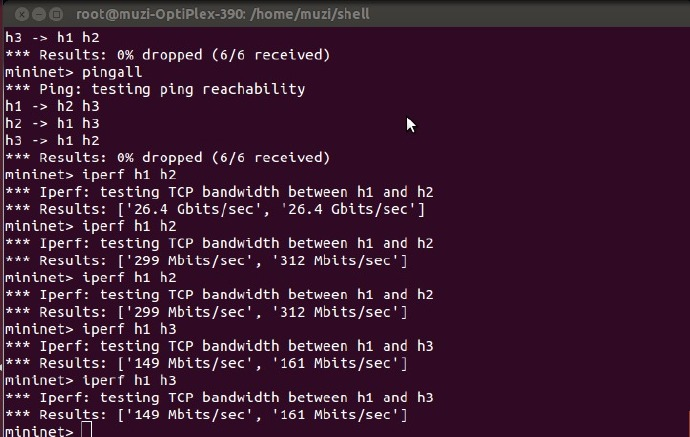
As we can see from the graph, there is no problem with
pingall connectivity. The first iperf is
running when queue is not set, and since no queue is found, it is not
queued, but only forwarded, with a bandwidth of 26.4Gbits/sec. The test
data after that is the data after the queue is set. You can see that the
bandwidth between h1 to h2 is 300Mbits/sec, while the bandwidth from h1
to h3 is 150Mbits/sec.
The reason for this is that we have selected queue 0 of
s1-eth3 in the group table for the data flow from h1 to h2,
and the maximum bandwidth of this queue is 300M.
At the same time another data stream from h1 to h3 is selected in the
hash process as queue 0 of port s1-eth2, and the maximum
speed of this queue is 150M.
The following figure shows the queue information.
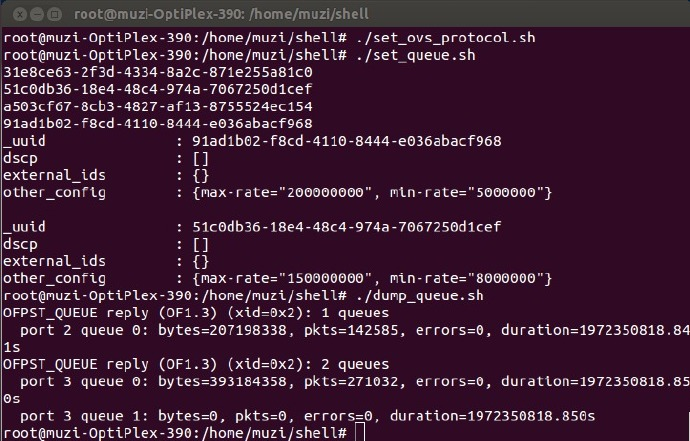
We can see that port 2 queue 0 and port 3 queue 0 have data, while port 3 queue 1 has no data.
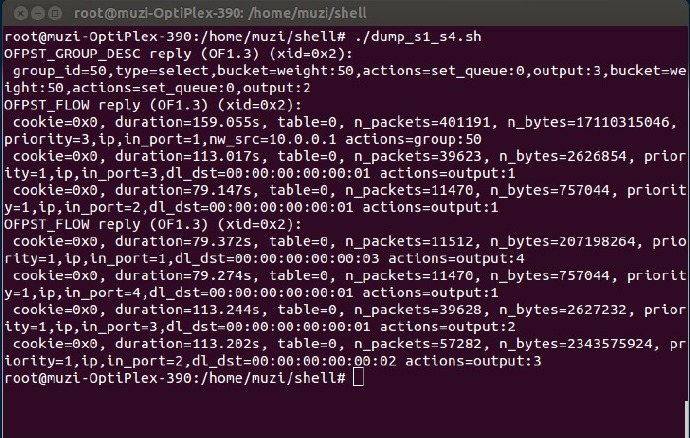
The above figure shows the group table and flow table information of
s1 and s4. From the flow table information of s4 (the latter part of the
flow table), we can see that the same data is from s1 to s4, the data
with dl_dst of h2 enters from port 2, while the data with
dl_dst of h3 enters from port 1, which verifies that the
data transmission process uses multipath transmission and makes
reasonable use of the bandwidth space. Multipath transmission can make
full use of link bandwidth and improve link utilization. At the same
time this experiment simply and brutally accomplished the load balancing
of the two links (the different data flows were evenly divided between
the two PATHs, and the traffic was not evenly distributed because
different bandwidths were restricted for different Paths). Adding
algorithms to calculate reasonable traffic paths according to the
topology and traffic conditions can accomplish more flexible and
effective load balancing functions.
Afterword
This is actually a simple experiment, but because of the many problems encountered during the installation of OVS, the process is rather painful, so I try to write it down to possibly help others. Here is another implementation which purely use OVS on the configuration, which is a bit easier compared to this. The original name of this blog is: Multipath and QoS Application on RYU, but my mentor reminded me that Multipath and QoS are not on the same level, so I realized that my knowledge is shallow. There are still too many things I need to work on. So this blog post was changed to the topic of Load balance, although it is very far-fetched, but in comparison, it is less of a mistake.
All the code files are in the multipath of github, please go to github to see the specific experimental steps.